
Sizewise
Measure with your phone's camera, draw the floor plan, and work out what to order. Made by SiggySoft LLC.
What it does
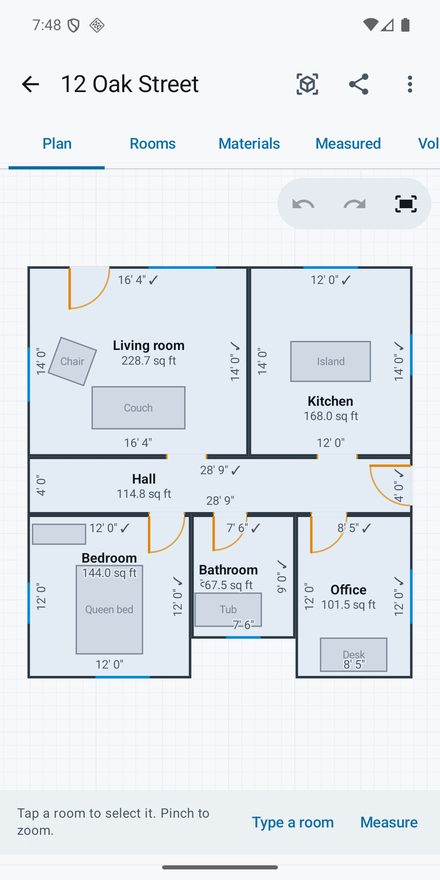
Sizewise uses the phone's camera and Google's ARCore tracking to measure distances, heights, areas and boxes. Go round a room tapping its corners and it becomes a floor plan with its square footage; measure a whole house in one walk and the rooms land in place next to each other. The plan opens in Sweet Home 3D on a computer.
Camera tape
Point to point, a path of several points, the height of a wall or a cabinet, a width kept level, the area of a patio of any shape, and the volume of a box or a piece of furniture, shown as soon as the shape is closed. Switch between feet and inches, inches, meters and millimeters right on the camera screen, and aim with a magnifier that shows the spot under the crosshair three times larger.
Trees and buildings
Aim at the foot of a tree, a shed or a building, then at its top, or at both sides for its width. Sizewise works it out from the distance and the angle; when the foot is too far for the camera, pace the distance and type it in.
Materials for each room
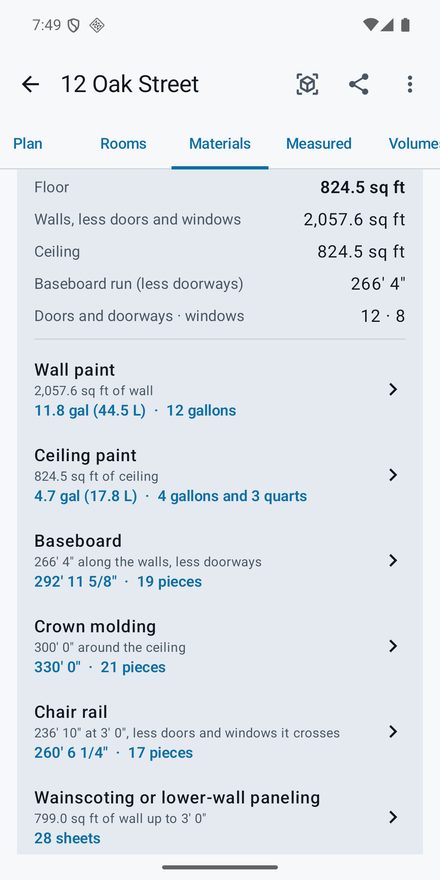
Gallons of wall and ceiling paint, baseboard, crown molding and chair rail with the pieces to buy, wainscoting and drywall sheets, flooring, carpet and tile, worked out from the walls, doors and windows you measured. Areas measured outside get pavers and sod.
Floor plans you can correct
Drag rooms together and they snap one wall's thickness apart. Line up two rooms by their shared doorway. Type a length you checked with a tape measure, and every room from that camera session is scaled to match.
Piles of mulch, gravel and dirt
Walk round the foot of a pile tapping its edge, then tap its top and any ridge. Sizewise works out the volume as the pile really sits on the ground, and its weight in tons.
Calculators and conversions
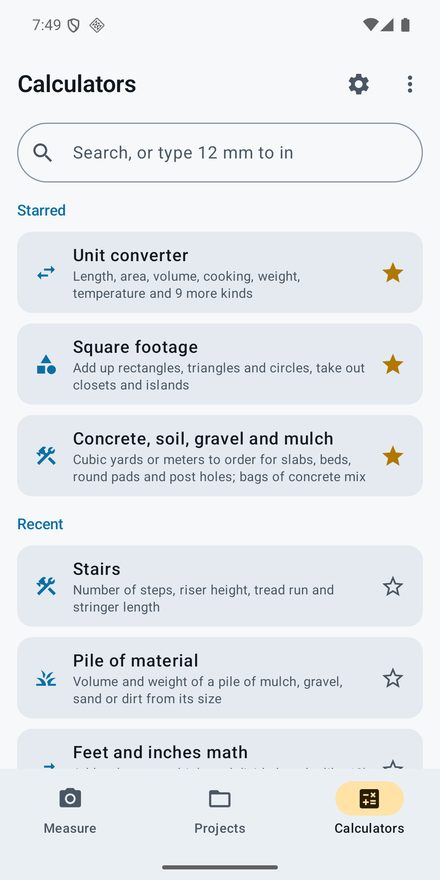
A unit converter (type "12 mm to in" in the search box), feet-and-inch math, square footage, and calculators for concrete, paint, flooring, tile, drywall, roofing, stairs, decks, fences, bricks, sod, tanks and pools, 2-stroke mix, air conditioner size and more. Each one names the source of its starting figures. Tap the camera beside a size to measure it instead of typing it. Turn on Fun mode in Settings to weigh things in chickens and blue whales, or measure them in bananas and football fields; every joke unit names the source of its size.
Get the app
- Android 8.0 or newer: download below
- Camera tools need a phone on Google's ARCore list
- Google Play: coming soon
- iPhone: in development
- No account, no ads, no tracking
Installing the Android download
Until Sizewise is on Google Play, Android asks you to allow the install once.
- Open this page on the phone in Chrome and tap Download for Android.
- When the download finishes, tap Open, or find Sizewise-1.4.3.apk in the Files app under Downloads.
- If Android says the phone is not allowed to install unknown apps from this source, tap Settings, turn on Allow from this source, then go back.
- Tap Install.
- The first time you open a camera tool, allow the camera. If the phone does not have Google Play Services for AR yet, Sizewise opens the Play Store to install it; it is free and made by Google.
If Google Play Protect says it does not recognize the app, tap More details, then Install anyway. A newer version installs over the old one and keeps your projects; uninstalling the app deletes them.
Measuring a house
- On the Measure tab, tap Rooms and floor plans and pick a project or name a new one.
- Point at the floor and sweep the phone slowly until Sizewise finds it.
- Aim the crosshair at each corner where the walls meet the floor and tap +, going round the room in order. If a couch hides a corner, aim at the same corner higher up the wall. Tap the first corner again to close the room.
- Aim at a corner where it meets the ceiling and tap + for the ceiling height.
- Add doors and windows by tapping two opposite corners of each, and furniture by tracing its footprint and then its top.
- Tap Save, next room and walk into the next room. Every room from the same walk keeps its place on the plan.
- Back on the plan, check one long wall with a tape measure, tap it, type the length, and tick Correct the camera's scale.
- Open the project's Materials tab for the paint, trim, paneling and flooring each room (or the whole house) needs. Tap a line to set the coats, the coverage on your can or the length of the pieces you buy.
Measuring a pile
- On the Measure tab, tap Pile and pick the material: mulch, topsoil, gravel, sand, compost or wood chips.
- Walk round the pile, aiming at its foot where it meets the ground, and tap + every few feet. Tap the first point again (or Close) to finish the outline.
- Aim at the top of the pile and tap +. For a long pile, tap points along its ridge too, and anywhere the slope changes; more points give a closer estimate.
- Read the cubic yards and tons at the bottom of the screen, and Save it to a project if you want to keep it.
The weights are typical figures for loose material from LA County Public Works, The Engineering ToolBox, Oregon State University, EPA and a landscape supplier; wet material weighs more, so your supplier's figure comes first. Without the camera, the Pile of material calculator works from a pile's width, length and height.
Opening the plan in Sweet Home 3D
Sweet Home 3D is a free interior design program for Windows, Mac and Linux, made by eTeks. In Sizewise, open the project, tap the share button and choose Sweet Home 3D file; email it to yourself and open the .sh3d file in Sweet Home 3D. The file holds the rooms with their names and floor areas, the walls (shared walls at the interior thickness, outside walls at the outside thickness), the doors and windows cut into them, furniture as boxes, and the wall lengths as dimension lines.
The same share button also makes a PDF of the plan with a table of rooms and their square footage, and a spreadsheet (.csv) of every number.
How accurate is it?
Camera measurements depend on light, on texture for the camera to lock on to, and on how slowly the phone moves. Plain white walls and shiny floors are the hardest. Google's ARCore documentation says its depth from motion is most accurate from half a meter to about five meters away (about 1½ to 16 feet). For anything you will cut or order, check a wall with a tape measure and type it in. Heights of trees and buildings come from an angle and a distance, and Sizewise labels them as estimates.
To see what your phone offers for measuring, open the menu and tap Phone diagnostics: whether ARCore is ready, depth from motion, a time-of-flight depth camera if the phone has one, every camera Android lists and the motion sensors, with notes on what they mean for accuracy. Tap any line for a plain explanation of what it is.
To see how accurate your phone is, run the accuracy test from Phone diagnostics: lay a tape measure on the floor, type its length, measure it with the camera three times, then three more times after reopening the camera. Sizewise shows the average error and how much the readings scatter, and Send to SiggySoft sends the readings so the camera's measurements can be corrected in a later version.
Privacy
The camera picture is used on the phone to track movement and find surfaces; Sizewise saves no photos. Projects stay on the phone until you share them, and the app uses the internet only when you tap Send to SiggySoft on a report. Google Play Services for AR, the Google app that does the tracking, sends Google an identifier, diagnostics and which ARCore functions are used; the privacy policy lists what Google says it collects.
Version history
What each version added, newest first. The app shows the same list (About Sizewise > Version history).
Version 1.4.3 · 2026-10-29
- Sending an accuracy test to SiggySoft: the attached files are written the way www.siggysoft.org counts them, and the app tells you before sending if they are over its limit of 3 files and 5 MB together.
Version 1.4.2 · 2026-10-26
- After an update, the app shows what changed in the new version the first time you open it, with a button for the full version history.
Version 1.4.1 · 2026-10-26
- Version history: About Sizewise now lists what each version added.
- Send to SiggySoft opens a review screen with everything that will be sent, attachments included. Nothing leaves the phone until you tap Send there.
- Phone diagnostics: tap any line for a plain explanation of what it means.
Version 1.4.0 · 2026-10-24
- A magnifier over the crosshair shows the spot you are aiming at three times larger.
- Accuracy test (Phone diagnostics): measure a known length a few times and see how far off the camera is on your phone.
- Send to SiggySoft: send feedback, the phone diagnostics or an accuracy test straight to SiggySoft.
Version 1.3.0 · 2026-10-24
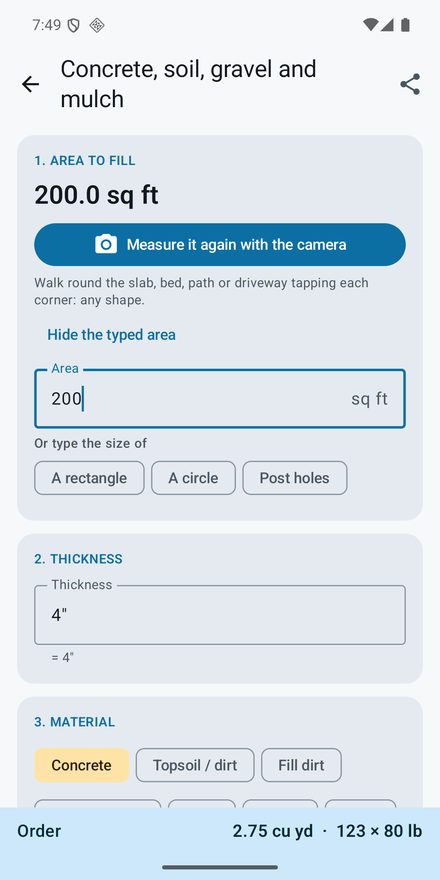
- A camera button beside the sizes in the calculators, square footage and the concrete calculator measures them for you.
- Phone diagnostics: what your phone offers for measuring, with notes on accuracy.
- Fun mode in Settings adds joke units, such as chickens and bananas, to the unit converter, each with the source of its size.
- The Materials list adds ceiling drywall, planks or paneling.
Version 1.2.0 · 2026-10-24
- Width tool in Camera tape, for doorways, trees and buildings.
- Box is now Volume and shows the volume as soon as the box is measured; Area shows the area on the camera view.
- An Inches setting, and a units button on the camera screen.
- The concrete, gravel and dirt calculator starts from an area measured with the camera.
- Materials for each room: paint, baseboard, crown molding, chair rail, wainscoting, drywall, flooring and tile; pavers and sod for areas outside.
- One Camera tape card that opens on the tool you used last.
Version 1.1.0 · 2026-10-24
- Calculators tab: a unit converter and 47 calculators for building, yard and home jobs.
- Pile tool: the volume and weight of a pile of mulch, gravel or dirt, measured with the camera.
- Three tabs along the bottom: Measure, Projects and Calculators.
Version 1.0.0 · 2026-10-23
- First version: measure distance, height, area and boxes with the camera, and the height of trees and buildings.
- Measure rooms with their doors, windows and furniture, and correct the floor plan by hand.
- Square footage, a 3D view, and how much concrete or soil to order.
- Share a project as a Sweet Home 3D file, a PDF or a spreadsheet.
Support and feedback
In the app, open the menu on the home screen and tap Send feedback, write what happened and tap Send to SiggySoft. The next screen shows everything the report holds; tap Send there, and the app shows a ticket number. Or email contact@siggysoft.org with your phone model, the app version (in About Sizewise), what you did, and what you expected to see. For a measuring problem, send the report from Phone diagnostics as well. To show a problem with a plan, attach its Sweet Home 3D file or PDF.
More from SiggySoft
Phone apps For Android now; the iPhone versions are on the way.
 OutdoorsGPS ToolboxSpeedometer, compass, altimeter, coordinates, tracks and waypoints from your phone's GPS. Android iPhone soon
 GamePinball by MiddleSiggyClimb from a channel's first upload to a million subscribers, with daily and all-time leaderboards. Android iPhone soonNetworkingNetwork ToolboxPing, traceroute, port scanner, subnet calculator, DNS, WHOIS, TLS inspector, and 10 more network tools. Android iPhone soon
 GameSolitaireThirty solitaire games with fair, random deals. No ads and nothing to buy. Android iPhone soon
 IT and securityWi-Fi ToolboxWi-Fi scanner with security grades, roaming test, heat maps, Bluetooth finder, portal and network checks. Android iPhone soon
Windows and Mac programs Programs for Windows 10 and 11, and for Macs.
 VideoSiggySoft TeleprompterA teleprompter for any screen: mirrored for the glass, scripts from your documents, a phone remote. Windows Mac Android soon iPhone soon
 VideoSiggySoft Media SuiteVideo capture, DV camcorder capture, editing and side-by-side comparison in one window. Windows soon